
Answer Summary
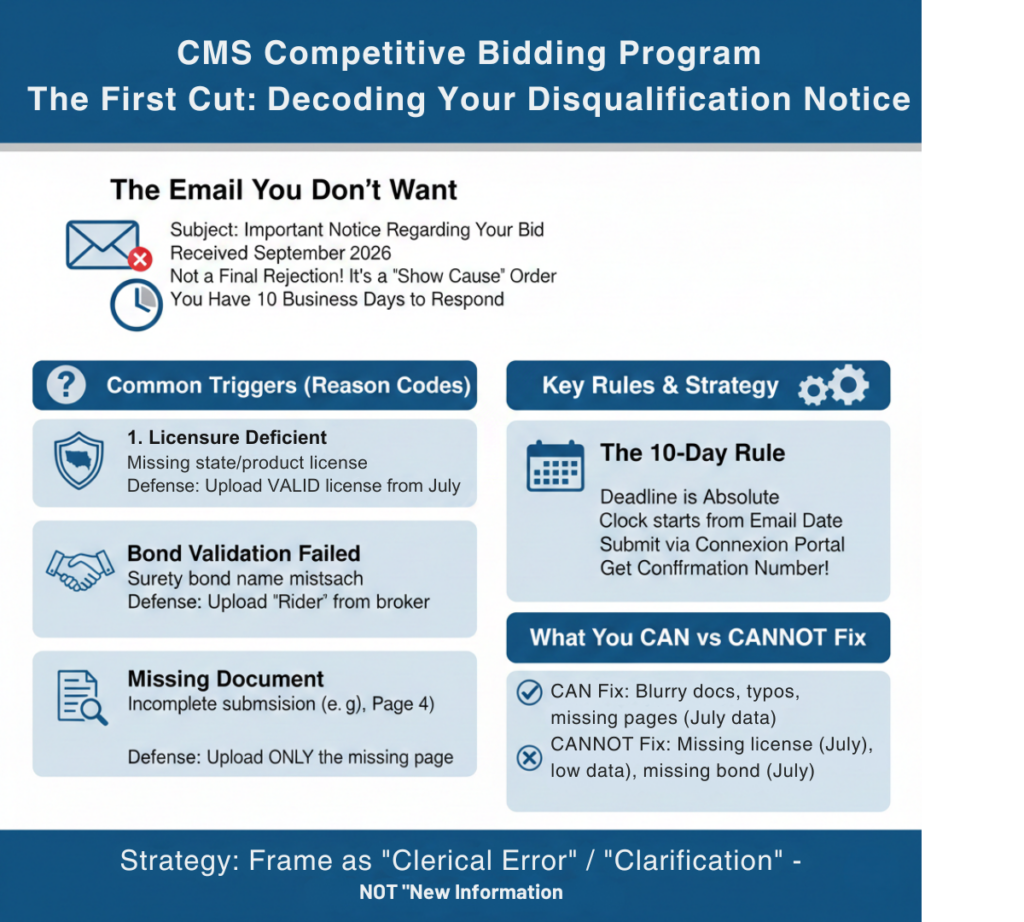
In September 2026, CMS begins sending “Notices of Disqualification” to bidders who failed the initial screening. These notices are not final rejections but “Show Cause” orders. Common triggers include mismatched licensure data, missing financial documents, or surety bond validation errors. If you receive one, you typically have 10 business days to upload the missing evidence to Connexion. Ignoring this notice or responding with “new” data (rather than clarifying existing data) results in permanent removal from the round.
Introduction: The Email You Don’t Want
You submitted your bid in July. You felt good.
Then, on a Tuesday morning in September, the email arrives.
Subject: CMS Competitive Bidding Program – Important Notice Regarding Your Bid.
Your heart stops.
This is the First Cut.
CMS computers have run the first pass of validation. They checked your Bond against your NPI. They checked your State License against your Region. They checked your Credit Report against your Capacity.
If anything didn’t match, you get a Notice of Disqualification.
Panic is your enemy.
Many providers read the word “Disqualified” and give up. They assume it’s over.
It is not over. This is often a request for clarification. But the clock is ticking. You usually have 10 days to prove them wrong.
Phase 1: Decoding the Reason Code
The letter will not simply say “You failed.” It will list specific Reason Codes. You must interpret these correctly to save your bid.
Code: “Licensure Deficient”
- What it means: CMS thinks you are missing a license for a specific state or product category.
- The Scenario: You bid on the “Midwest Region” (IL, IN, OH). You uploaded licenses for all three. CMS says you are missing Ohio.
- The Defense: Check the PDF you uploaded. Was it blurry? Was it the expiring license instead of the renewed one?
- The Fix: You cannot apply for a new license now. You must prove you held the license on the day bidding closed. Upload the valid license with a stamp showing the effective date covers the bid window.
Code: “Bond Validation Failed”
- What it means: The surety bond registry didn’t match your PECOS name.
- The Defense: Upload the “Rider” from your broker that corrects the typo.
- Critical Note: The bond must have been effective before the bid window closed. You cannot buy a new bond today to fix a July error.
Phase 2: The “Missing Document” Request
Sometimes, it’s not a disqualification; it’s a “missing data” flag.
- Scenario: You uploaded your Tax Returns, but Page 4 was blank.
- The Request: “Please upload complete Page 4.”
- The Trap: Do not re-upload the whole return if they only asked for Page 4. Giving them more data than requested opens you up to more scrutiny. Give them exactly what they asked for.
Phase 3: The “10-Day” Rule
The deadline is absolute.
- The Countdown: The clock starts the day the email is sent, not the day you read it.
- The Submission: You must upload your response via the Connexion portal. Do not email it. Do not mail it.
- The Receipt: Just like the bid itself, you must get a Confirmation Number for your response.
Phase 4: What You Can vs. Cannot Fix
- You CAN Fix: A blurry document, a typo, a missing page of a document that existed in July.
- You CANNOT Fix: A license you didn’t have. A credit score that was too low in July. A bond you forgot to buy.
- The Strategy: Your response must always frame the issue as a “Clerical Error” or “Clarification,” never as “New Information.”
WWS Value Proposition: We Write the Defense
Responding to a Disqualification Notice requires the precision of a lawyer. Wonder Worth Solutions offers “Bid Defense Support.”
- Analysis: We review the Reason Code and your original submission to find the disconnect.
- Packet Prep: We organize the evidence (licenses, riders, docs) into a compliant PDF package.
- Narrative: We write the cover letter explaining why the original submission was correct and where the auditor can find the proof.
Received a Notice?
Do not reply until we review it for Emergency Bid Defense.